Your laptop deserves better than a flimsy sleeve stuffed into an oversized bag, and your back deserves better than a strap digging into your shoulder after ten minutes at the airport. Yet most professionals buy a briefcase based on looks alone, only to discover its flaws during the first rainstorm, the first cramped flight, or the first time they need a charging cable mid-meeting and realize there’s nowhere to plug it in.
A genuinely functional laptop compartment briefcase is built on a specific set of engineering decisions. From the debate over leather vs nylon briefcase construction to the hardware that determines whether your zippers survive year three, every feature either earns its place or becomes dead weight. This guide breaks down what separates a briefcase that performs from one that just looks good on a shelf, so your next purchase is based on standards.
Padded Laptop & Tablet Compartment: The Non-Negotiable Core Feature
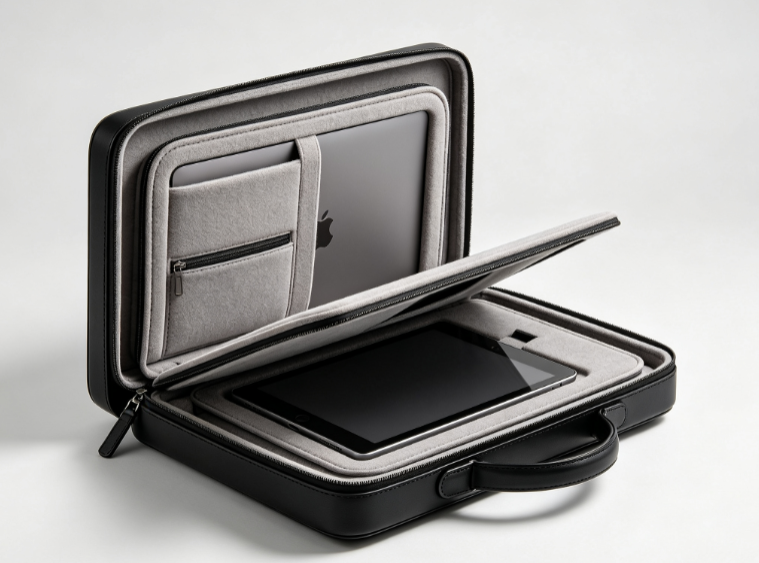
Foam thickness is where most briefcases quietly fail. A padded laptop compartment that looks protective on the shelf often turns out to be nothing more than a decorative liner once you check the specs.
What “enough padding” actually means
Industry sourcing guides set a clear line: 5mm of foam is scratch-only protection, only good for surface abrasion. For genuine shock absorption, look for 8–10mm high-density EVA or neoprene foam, ideally with a density of 120 kg/m³ or higher. Cheaper foam fails a simple finger test: if it compresses flat under light pressure or springs back in under a second, it won’t absorb a real drop.
Suspension matters as much as thickness
The best laptop compartment briefcase designs use a suspended or false-bottom sleeve, lifting the laptop 20–30mm above the bag’s actual base. When the bag hits pavement, train floors, or gets tossed under a car seat, the laptop’s floor absorbs the shock, not the device itself.
Coverage that’s easy to overlook
Padding should wrap the back, front, bottom, and sides, with bottom and corners reinforced most heavily, since that’s where drops concentrate impact. Real-world failure reports back this up: hairline screen cracks and chipped chassis corners are consistently traced to unpadded bottoms, not front panels.
Sizing pitfall to avoid
Ignore the “Fits 15.6-inch laptops” label. Actual laptop widths within the same screen class can differ by 10–20mm. Always measure your device’s body (width, depth, thickness) against the compartment’s interior, not the screen size printed on the box.
Structured Body vs Soft-Sided Design: Why Shape Matters
A briefcase either holds its shape or it doesn’t. That single fact decides whether your contracts arrive flat or crumpled. Structured bodies keep a defined 3D form under pressure. Soft-sided bags flex and let external forces reshape whatever’s inside.
The flatness math behind flat documents
In engineering, a surface is flat when all points fall within tight parallel planes—often within 0.05mm. Apply that to briefcases: structured panels that hold flatness variation under 1mm across the document length behave like a filing cabinet drawer. Soft panels, by contrast, can deform 5-10mm under nothing more than a squeeze between your body and a car seat.
On an A4 stack (210×297mm), an 8mm inward bow on a soft side panel creates about 1.5° of angular warp—enough to produce the visible C-curve and corner creases lawyers know too well. A structured panel limiting deflection to under 1mm keeps that warp near 0.2°, well below the threshold where creasing becomes permanent.
Laptop compression is the hidden risk
Most 13–15″ business laptops tolerate concentrated top-cover loads up to 20-30 kgf before permanent LCD deformation. Slide a soft briefcase under an airplane seat, and a seat bar or your leg can compress the panel 10-20mm inward, transferring 4-8mm of deflection directly onto the laptop lid. That’s enough to leave keyboard imprints on the screen after just one or two long trips. A structured shell with load-spreading ribs holds outer deflection to 2-3mm under the same pressure, cutting peak stress on the device by 2-4x.
Why heavy users default to structure
Survey data from premium bag makers backs this up: over 70% of lawyers and 60-65% of finance professionals say they specifically want a bag that “keeps documents from bending.” Among those carrying more than 300 sheets daily, structured or semi-rigid briefcase adoption jumps to 80-85%. Litigation lawyers moving 500-1000 sheets on peak days, or bankers hauling 300-600 page pitch books, aren’t choosing structure for aesthetics. They’re avoiding wrinkled exhibits, dog-eared corners, and binder covers that bow out of shape in front of clients.
Smart Multi-Compartment Organization System
Five to seven compartments is the sweet spot for briefcase organization. Most users say anything more than that feels confusing. Anything fewer, and you’re back to digging through one big cavity every time you need your charger.
The winning configuration
The best briefcase layout gives you one main compartment, one dedicated tech pocket, one document sleeve, 2-3 front pockets, and 2 side pockets. The tech pocket sits flush against the back panel, 25-35mm thick with reinforced padding. That keeps your laptop’s weight close to your body, which cuts down shoulder strain.
Why single-cavity bags fail
Toss a laptop, charger, and notebook into one main compartment, and hard edges collide. Scratched laptop shells and dented charger bricks are the most common complaints with single-cavity designs. Tool organization brands figured this out years ago: Milwaukee’s PACKOUT system uses 6 adjustable dividers to stop small parts from migrating and mixing.
Quick-access pockets matter more than you’d think
Front pockets for keys, transit cards, and phones cut search time dramatically during daily commutes. A key clip with a 10-15cm lanyard lets you pull keys out without fully opening the pocket. Pen slots (10-15mm diameter), card sleeves sized for standard cards (86×54mm), and a zippered mesh pocket for cables give every item one obvious home.
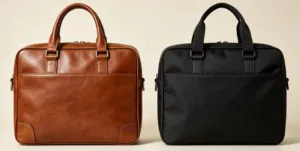
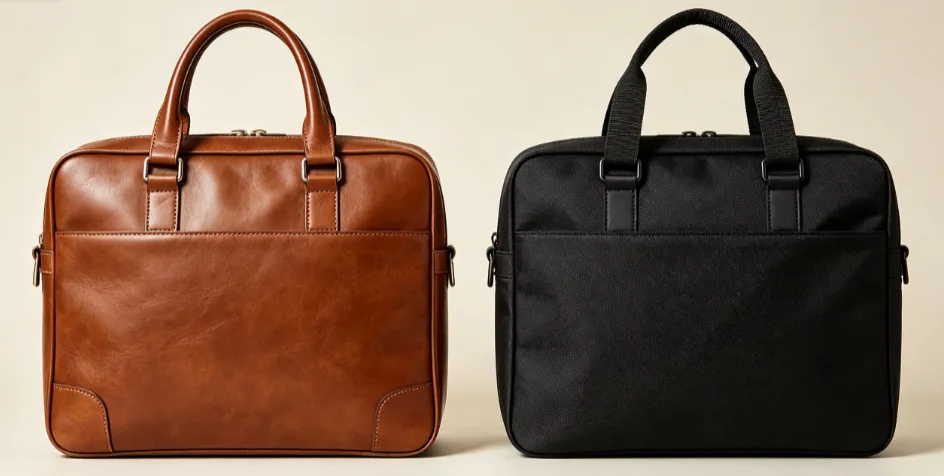
Material Durability: Full-Grain Leather vs Ballistic Nylon
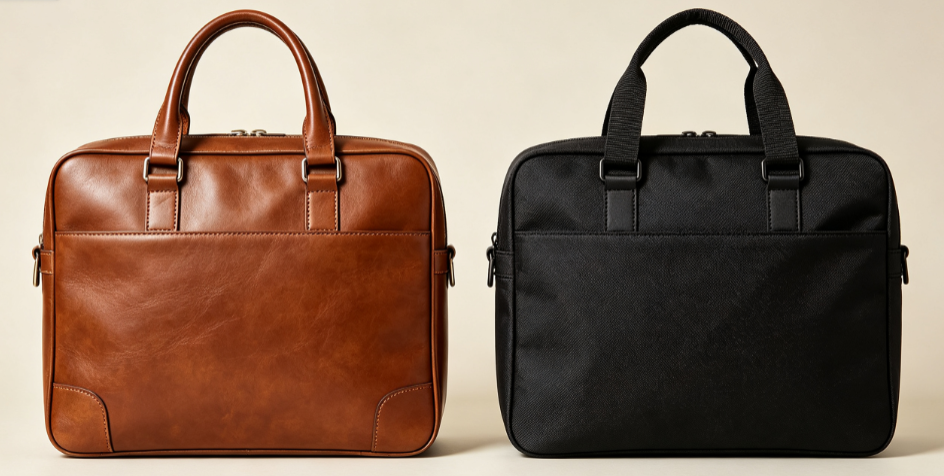
Twenty years versus ten. That’s the realistic lifespan gap between full-grain leather and ballistic nylon in daily briefcase use, and it’s the number to keep in mind when choosing.
Lifespan and structural aging
Full-grain leather briefcases last 15–30+ years with proper care, some heritage pieces pushing toward the century mark. Ballistic nylon (1050D or higher) delivers 8–15 years. The failure points differ: leather’s hinges and panels stay intact for decades, while nylon bags fail at the zippers and hardware long before the fabric gives out.
Abrasion, water, and weight tradeoffs
|
Factor |
Full-Grain Leather |
Ballistic Nylon |
|---|---|---|
|
Tear strength |
≥20 MPa |
Higher tensile-to-weight ratio |
|
Water resistance |
Poor untreated, needs conditioning |
Excellent, dries fast |
|
UV resistance |
Fades, dries out |
Colorfast |
|
Weight |
2–3× heavier |
~1/3 the weight |
|
Maintenance |
Conditioning every 6 months |
Wipe-clean, low effort |
Cost per year tells the real story
Leather briefcases run $250–700 mid-range, nylon $120–350. Divide by lifespan and both land around $12–35/year. Leather front-loads spend for a multi-decade investment; nylon suits a 5–10-year refresh cycle for professionals who travel hard and want abrasion resistance without the upkeep ritual.
Water Resistance & Weatherproof Protection for Electronics
“Water-resistant” and “waterproof” get used interchangeably in marketing copy, but they mean very different things for the laptop inside your bag. Water-resistant means the fabric survives light rain or a quick splash. Waterproof implies the bag holds up under heavier exposure, and that claim needs an actual IP rating.
Reading the IP scale
The Ingress Protection standard uses a second digit that tells you what matters. IPX4 covers splash resistance. IPX6 withstands a strong water jet, tested at roughly 100 L/min, 15 psi, from 3 meters, for at least 3 minutes. IPX7 means 1 meter of submersion for 30 minutes. If a listing says “water-resistant” with no IPX number attached, assume it handles light splashing.
Where water kills electronics
PCB boards and display modules are the failure points, not the outer fabric. That’s why structural verification matters more than surface treatment.
What to check before buying
-
Water-repellent coating (DWR, silicone, or acrylic spray) on the outer fabric
-
Sealed or water-resistant zippers, not standard metal pulls
-
Taped or glued seams at the base and bottom corners
-
An independent waterproof liner separating the laptop compartment from outer pockets
For daily commuting through rain, water-repellent fabric plus a sealed zipper covers most scenarios. For high-value laptops facing regular downpours, look for IPX6/IPX7-rated construction with taped seams and an isolated inner compartment.
Stitching, Zippers & Hardware Quality
Handle straps snap. Zippers jam mid-meeting. Hardware bends until it gives out. These three failure points account for most briefcase returns, and they’re predictable if you know what to check before buying.
Stress-point stitching that holds
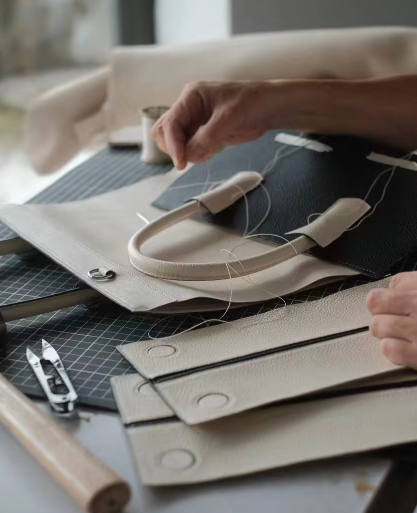
Handle and strap connection points need box-X stitching combined with bar-tack reinforcement. Industry sourcing data shows that triple-needle stitching plus bar-tack reinforcements at high-pressure points extends product lifespan by roughly 30%. Seams should run straight, with no skipped stitches, no knots, and locked stitch ends. Loose threads at the finish line signal rushed manufacturing.
Two standards matter here. EN ISO 13935-2 measures the force needed to tear a seam apart. EN ISO 12947-2 (Martindale) measures abrasion resistance. The gap is significant. Standard cotton survives about 20,000 cycles, while Cordura® reinforcement pushes past 100,000 cycles. That’s the difference between a handle base that lasts two years and one that lasts ten.
A simple destructive test tells you everything
Grab the handle loop or a pocket corner and pull hard. If the fabric tears before the seam gives way, the construction passes. If stitching pops first, walk away.
Zippers: Where Most Complaints Concentrate
Sticking, fabric-biting, misaligned teeth, broken pull-heads. These are the top complaints, and they all trace back to cheap zipper hardware.
Reliable zippers
-
Heavy-duty YKK or equivalent-grade zippers
-
Pull-tabs for stable, one-handed operation
-
Bar-tacked or reinforced ends at both zipper terminals, preventing seam-opening from repeated use
-
No wave, pucker, or flare in the stitching surrounding the zipper track
Run the zipper back and forth 20-50 times before buying, if you can. Skewing, skipped teeth, or resistance at that stage predicts failure within months.
Hardware: Solid Metal vs. Thin Cast Alloy
D-rings and metal loops come in two types: solid metal and thin die-cast alloy. Solid rings distribute pulling force across the handle and seam. Thin cast pieces deform under the same load, and once a connection hole ovals out, the whole strap assembly is compromised.
Checklist for judging hardware quality
-
Solid metal construction
-
No burrs or sharp edges (these slice through webbing and thread over time)
-
Reinforced connection holes with bar-tacking, backing fabric, or edge binding
Warranty as a durability signal
Many durable briefcase brands offer 1-5 year limited warranties, some extending to lifetime coverage. When comparing options, check whether the warranty covers zippers, hardware, and handle failure, the three most common breakdown points. A brand confident enough to guarantee “no functional failure at stress points for 3-5 years” has usually already run the stress tests you’d want to run yourself.
Ergonomic Carrying Options: Handles, Straps & Weight
Three pounds of empty bag weight might not sound like much, until you’ve added a laptop, charger, and a stack of files, and your shoulder is screaming by lunchtime. The ergonomic briefcase strap determines whether you arrive at a meeting fresh or with a knot in your trapezius.
Handle width and padding, by the numbers
-
Handles and grips need a minimum width of 25mm (1 inch). Narrower straps concentrate pressure into a single line across your palm, cutting circulation on longer carries.
-
Leather handles thinner than 3mm aren’t built for daily loads over 4kg (8.8 lb). Webbing handles under 15mm face the same problem.
-
Padding thickness should scale with load: 3-4mm foam for 1.8-3.6kg, 5-6mm for 3.6-6.8kg, and beyond that, a single-hand grip stops making sense entirely.
Shoulder straps and the 8-lb threshold
Once your loaded bag crosses 8 lb (3.6kg), strap width matters more than style. Daily 4-8 lb loads need at least 25mm of width. Push into the 8-15 lb range, and you want 38-50mm straps with 5-8mm of dedicated padding, ideally worn cross-body to spread the load. NIOSH caps ideal two-handed lift weight at 51 lb before back-strain risk climbs sharply, and a reasonable target for daily carry sits under 10-15% of your body weight.
Where trolley straps come in
A rear trolley strap that slides over rolling luggage handles removes shoulder load entirely during airport transits, letting the wheels absorb what your shoulder used to. For anyone flying regularly, this feature is the design detail that separates a travel-ready briefcase from one that only works for a walk to the office.
A quick physical test
Load the bag with your actual daily items, wear it cross-body for 60 seconds, and check for pinching, sliding, or hotspots at the shoulder. If discomfort shows up that fast, it won’t improve after month three.
Security Features: RFID Protection & Lockable Closures
Electronic pickpocketing sounds terrifying, but the numbers tell a calmer story. Surveys show 40-60% of people worry about digital skimming, yet fewer than 5% ever experience it. Still, an RFID protection briefcase earns its place, because peace of mind during international travel matters even when statistical risk is low.
How RFID shielding works
A conductive layer — metal fiber or metal-coated polyester — sits between the lining and outer fabric, creating a Faraday cage that blocks 13.56 MHz signals. EMV contactless cards normally read at 0-4cm; a properly shielded pocket drops that to 0cm. The catch is that shielding must wrap the entire pocket continuously. Gaps wider than 3-4cm leak signal. Most briefcases skip full coverage and instead build 1-2 dedicated RFID-safe pockets sized for 4-8 cards plus a passport, rather than shielding the whole bag.
Lockable closures for real-world scenarios
Lockable zippers use dual pull-tabs with metal grommets, compatible with TSA locks. Lawyers carrying client files and traveling professionals leaving bags in hotel rooms treat this as near-essential, with many willing to pay a 10-20% premium for locking capability.
Modern Tech Integration: USB Charging & Cable Management
Digging through a tangle of cords for a charger cable, mid-meeting, is a small humiliation professionals have learned to expect. A briefcase with USB charging port support fixes that, but only if the internal layout is designed with intent.
What a functional setup looks like
Most charging briefcases build in 1-2 USB-A ports on an internal hub, with a pass-through cable running 15-30cm to a dedicated power bank pocket. That pocket needs to measure 140-160mm (L) × 70-80mm (W) × 20-25mm (H) to fit a standard 10,000-20,000 mAh brick.
Sizing power correctly
Add up your devices’ max draw. Laptop (65W), phone (20W), earbuds (5W) totals 90W. Choose a hub rated at least 20% above that load, so ≥108W. Reserve USB-A ports for low-power accessories, and charge the highest-draw device first.
Cable routing that doesn’t fray
Bundle cables by destination, keeping the laptop compartment separate from the phone pocket, and secure with velcro ties every ~20cm along structural edges to prevent strain at connection points.
Professional Aesthetic & Use-Case Matching
A courtroom and a co-working space demand different bags, even when both need to carry a 14-inch laptop. The right design matches your career context to the visual signals you want to send.
Lawyers default to traditional box-shaped briefcases: 10-14cm thick, 38-42cm wide, full-grain black leather with matte gunmetal hardware (60-70% preference). Structural lines stay minimal — one center seam, 0-1 external pockets. The look projects confidentiality and rigor.
Entrepreneurs lean toward slim briefcase for laptop styles: 6-9cm thick, under 1.2kg loaded, rounded 8-15mm corner radius. Leather-nylon hybrids (400-600D) with visible zippers and navy or charcoal tones signal mobility over formality.
Finance executives land between the two: 8-11cm thick executive briefcases in black or deep navy, low-gloss hardware, 3-4mm stitch spacing in tone-matched thread. Visual “noise” stays under 8 elements total.
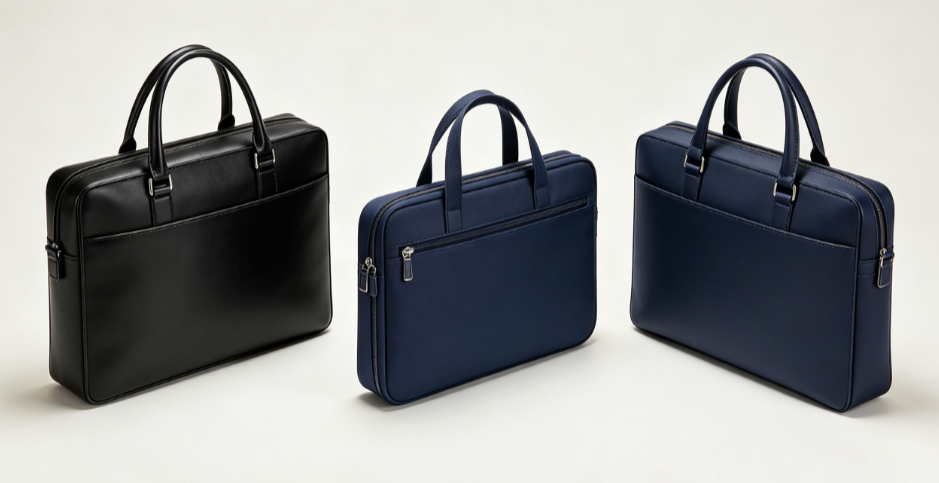
Search intent confirms this split. “Executive briefcase” buyers skew toward $600-800 mid-range leather goods with authority-driven aesthetics. “Slim briefcase for laptop” searchers cluster at $120-160, prioritizing weight and device fit over prestige signaling.